

Bilantan FAQs
Explore our FAQs for helpful answers or reach out to us directly for personalized assistance.
Connection & Status FAQs
How to Set Up a New Bird Feeder
RE:
Bilantan: Charge for enough battery power, Tap “+” or “Add Device” on home page, Choose device type, Scan the QR code on the device, Enter WiFi information, camera scan the QR code on the app, Click heard button.
Bilantan Pro: Charge for enough battery power, Tap “+” or “Add Device” on home page, Choose device type, Select Bluetooth searching device, Enter WiFi information.

WiFi connection failed/WiFi connection time out for 120s/Fail to connect to the server
RE:
Bilantan: 2.4GHz WiFi not 5GHz WiFi, Without special characters, Correct password, phone remains the same WiFi.
Bilantan Pro: Please connect to the desired Wi-Fi network in your phone's Wi-Fi settings, then return to the app to confirm that you are syncing with the same Wi-Fi name. You can also enable password visibility to confirm that you entered the correct password.
If your problem is still not solved, please contact Bilantan customer service for assistance.
What should I do if the screen shows the device is offline?
RE:
1) You can disconnect the power to the Bilantan device, then turn it back on and wait for the device to come online automatically. If the device is not connected to the Internet, you can try to reconfigure the Bilantan camera's network or use a network cable to connect to the network.
2) If the device is still not connected to the Internet, please provide the Bilantan device ID, firmware version information and router model number, and contact Bilantan customer service.
3) If it is a 4G device, please make sure the data card still has traffic and the data card is not violating the binding. You can go to their website and ask the card dealer.
How to choose a right place to make sure the Wi-Fi Signal is sufficient?
RE:
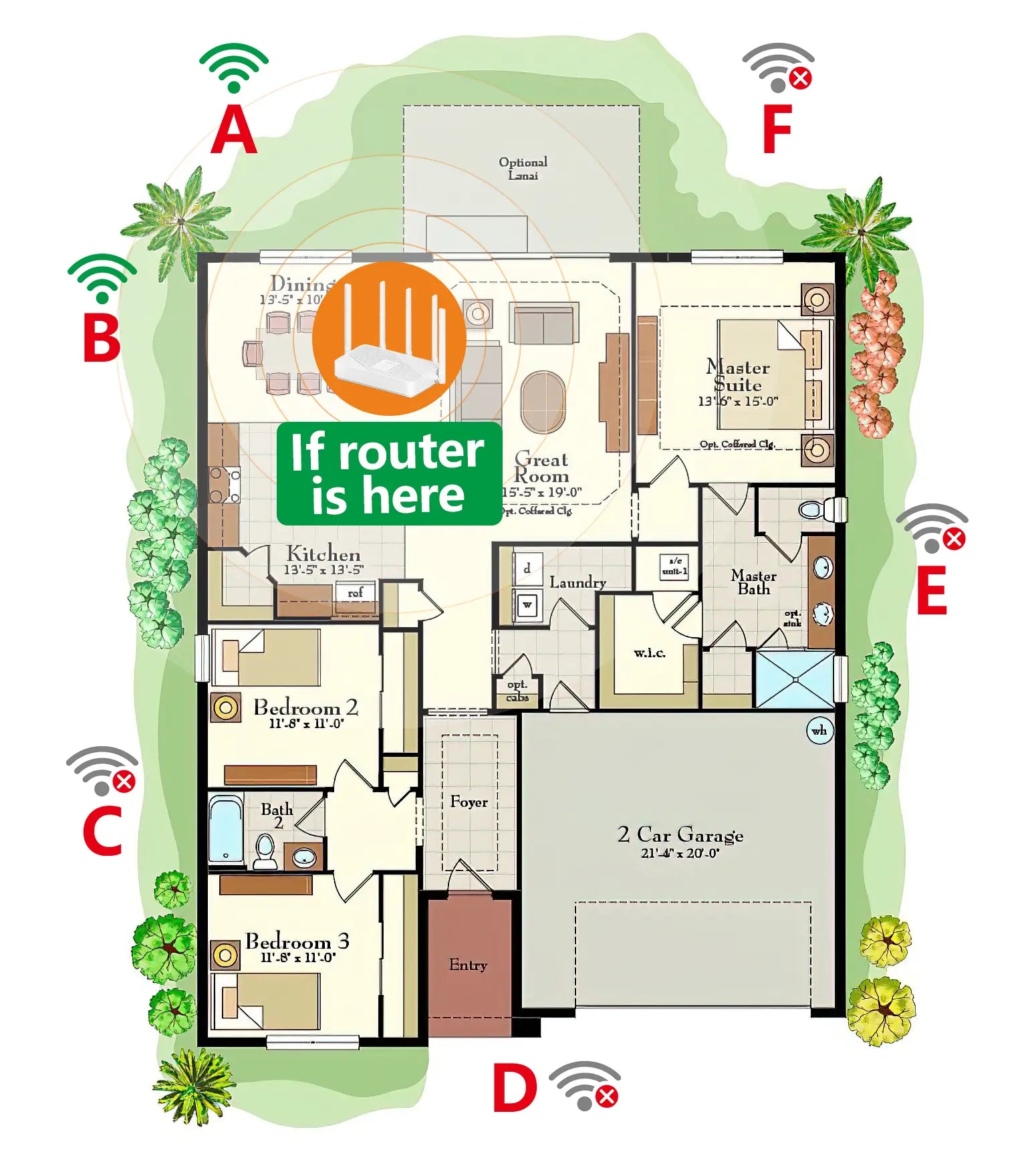
Take the feeder with camera outdoor, then walk around a bit and try to find some spots where the livestream is working well. Then choose the suitable place to install the feeder. Pls, check the Wi-Fi selection guide image. Position A and B are better for outdoor WiFi connection because there is only one wall between router and feeder. If you still can't find the suitable place to install. You have to change router place or buy a WIFI extender.
Why is my camera offline?
RE:
The reason might be that the network was blocked or affected.
1) Low battery: Ensure the camera’s power is above 20%. If the camera is off, it will stay offline.
2) Wi-Fi strength: Keep the camera close to your router with minimal obstacles.
3) Router capacity: Disconnect less-used devices if your router has a device limit.
4) Unstable Wi-Fi channel: Restart your router and prioritize the camera connection to select a stable channel automatically.
5) App/Firmware versions: Make sure both the app and camera firmware are up to date.
Have many device/Have two cameras/Have old camera and new camera
RE:
All can be added. Each camera is processed independently, preventing data contamination. Both new and old camera models can be added simultaneously.
Where to download Bilantan Pal APP?
RE:
You can scan the QR code on the manual or click the download link at the bottom of the website to install the “Bilantan Pal” APP for use.
Why doesn't passing in front of the camera or waving generate an event?
RE:
Your movement will wake up the device and capture a picture. But the camera features an AI recognition filter. It would only record birds and squirrels, but not human beings or other pets.
Update the firmware failed
RE:
If the update fails or cannot be continued, please contact us and provide your device ID. We will then issue another update.
Live & Video FAQs
I keep buffering when I start watching the real-time videos, what should I do?
RE:
1) Check whether the router connected to the Bilantan/Bilantan Pro camera can connect to the external network normally, or restart and configure the router.
2) Check whether the mobile phone can connect to the Bilantan server normally.
3) Close and restart the Bilantan Pal App.
4) Re-plug the power supply of the camera and restart the camera.
What should I do if the video and sound are out of sync and there is a delay?
RE:
1) Please check the environment network where your Bilantan/Bilantan Pro device is located.
2) Limit the number of simultaneous online viewers Appropriately.
3) Try to restart the Bilantan Pal APP or Bilantan camera.
Why can't I see a bird through the camera for a long time?/Why there are no birds visiting the feeder?
RE:
1) Mix different kinds of seeds/food. Such as new seeds, suet, nuts, fruit, mealworm, etc.
2) Learn about the common birds in your state. Put the food they like.
3) Place the Bilantan bird feeder in the same general area as the old feeders.
4) Position your Bilantan bird feeder in an attractive, safe location.
5) Be patient. Birds need time to find and adapt to a new feeder.
Where can I check guide videos?
RE:
1) On our Web: www.bilantan.com -- Homepage -- Supports -- Tutorial Video.
2) In our App: App -- Me -- Getting Started Guide -- Related tutorials.
How do I download/share/transfer/delete bird videos?
RE: To download a single video, simply click the download button at the top of the event details page. If you want to download multiple videos in batches or combine them, click "Manage" on the event page, select the videos you want to download, and then click the download button at the bottom. Batch sharing/moving to Gallery/deleting follow the same steps.

Invitee account no notifications/Offline/Can not view the live streaming
RE:Check with the main account to see if the same issue exists; if so, it's a camera problem. If the main account is working correctly, try switching to a different mobile network to see if it works. You can also try logging into the app again, or downloading the latest version of the app.
Why can't the video be played?
RE:
1) If SD card storage, please check your SD card capacity. 128G is max.
2) If SD card storage, please tap the live stream to wake up camera first then view bird video in Event.
3) If SD card storage, please check whether the memory of SD card is full.
How to delete event videos?
RE:
If cloud storage, The events video will be deleted as the cloud record history automatically. For example, if your order 7 days history record , the first day videos will be deleted on the eighth day automatically.
If Micro SD card storage, take out the SD card and read it in computer to delete the event videos.
Storage & Settings FAQs
What is the difference between cloud storage and local SD card storage?
RE:
1) There are uncontrollable risks in the local SD memory card.
Risk 1: When the local SD memory card is read and written multiple times, its service life will be greatly reduced, and the recording time will be shortened.
Risk 2: In the case of being taken away by an uninvited guest or damaged, the data will be gone forever. But if the data is stored in the cloud, it can avoid the risk of damage to equipment and memory cards.
Risk 3: You have to use a brand new SD card or a used SD card with no storage files in it to set up the bird feeder and then get it to work normally. So it’s a waste of money to buy a new one or a waste of time to transfer the files in a used SD card to another place.
2) Cloud storage is your best choice for peace of mind. Cloud storage is to store videos in the cloud. Even if the device is damaged, you can still view the saved videos.
Is cloud storage safe?
RE:
Bilantan's cloud service uses Amazon servers, financial-level defense measures, and dynamically encrypted data transmission. One account, one device, corresponds to an independent cloud space, so you don’t have to worry about data loss or privacy leaks, and you can avoid the risk of losing key evidence if your device is stolen.
What type of SD card can be used in the Camera?
RE:
It is better to use a new Micro SD card, preferably with a capacity of 8GB-128GB, and well-known brands such as SanDisk, Kingston, Samsung, Sony, and others are recommended. If you choose to use a used SD card for data storage, please format the SD card first before using it.
Is cloud storage free?
RE:
Sorry, cloud storage is not free except for the first month of use. Cloud and SD card storage are two storage options. We purchase space from Amazon Cloud for client storage. You have to pay the space fee, as low as USD 1.99/month, to Amazon Cloud. We don't earn any money from Cloud. Another option is Micro SD card storage, which allows you to use your own card to save the video locally.
Micro SD card or Cloud is necessary for using?
RE:
Yes, Micro SD card or Cloud is necessary for video data storage. 16G-128G Micro SD
Card can be compatible for our camera. 128G is max.
How to set clock with right Time Zone?
RE:
Bilantan Pal App -- Home -- Settings -- Device Settings --Time Zone -- Chose your Time Zone -- Save
The picture is black and white. How to change it into colorful?
RE:
Bilantan Pal App -- Home -- Settings -- Device Settings -- Dual Light Control -- Auto Switch
Device drop off/Device not stay online for a long time/Need to wake up
Our camera is in a power-saving mode most of the time. Only the camera detects movement in front of it; it then wakes up and begins to work. To conserve battery life, the camera will enter sleep mode after recording an event.
APP & Identification FAQs
Why can't I receive events from the APP?
RE:
1) Kindly check whether the Wi-Fi is connected properly.
2) Please check whether get Cloud Storage or inserted a Micro SD card for storage.
3) Kindly wait for the birds to discover the new feeder.
If all the above are okay, kindly email us your device ID. Our engineers will analyze it and reply within 8 hours.
Why my account cannot login to the Bilantan Pal?/Can I use the former account on Bilantan Pal?
RE:
Because we've updated our back-end servers, you'll need to register a new account to use the new app. While your previous account is no longer valid, you can register using the same email address.
How can I obtain my device ID and logs?
RE:
1) Device ID guide: Bilantan Pal APP - Home - Settings - Device ID is at the top of the page.
2) Please follow this navigation to send your device logs: “Home--Device--Settings--Help & Support--Send Device Logs”
3) Log sending guide: Bilantan Pal APP - Me - Help and Feedback - Send Logs by email to support@bilantan.com.
Is the bird AI recognition free?
RE:
Yes, it is a free service. Of course, the current AI service is free for 1 year. But we will share this AI technology soon. Bird recognition will be free for all users. Our APP will be updated in the next few months. You will never pay any extra money for the AI cost. Our AI will keep learning and updating accordingly.
Does this smart camera have motion detection?
RE:
Yes, our camera's motion detection is updated based on smarter AI. All motions will be detected, and our AI will identify the records, keeping only the bird and squirrel records to generate real-time notifications on our Bilantan Pal App. This will provide you with more precise bird notifications and avoid unrelated spam.
Can App be use in iPad?
RE:
No, it can’t. Our App is only for IOS and Android system. iPad system is iPadOS. So some functions such as share and download can’t compatible for IpadOS system.
Subscribed to the Cloud twice/Subscribed the wrong plan
RE:
Please go to the Cloud order page by “Home--Settings--Cloud” or “Me--Cloud”. Click the top right corner to view your order history. Send us a screenshot and indicate which order you need a refund for. And we will check it.
We will process refunds for orders placed within 30 days of the purchase date. Please be informed.
No TF card/Stop recognized the TF Card
RE:
Please use a card reader on your computer to check if the TF card is working properly. You can try formatting it in the app or replacing it with a new, working card. If it still shows no card, the device's card slot may be damaged.
Please use the format function within the App. Our camera only accepts files in FAT32 or exFAT formats.
No notifications/Delay notifications
RE:
Please check if notifications are enabled in your app and on your phone. If there's a push notification delay, it might be due to a busy background server or a poor network connection on your phone. Please check back later.
Events recognition/Bird ID recognition/Wrong species
RE:
It could be due to insufficient lighting or the bird's position and angle in the screenshot. You can slide to the bottom and correct the result. We will pass it to our algorithm team for investigation.
Hardware & Other FAQs
Why solar charging is slow?
RE:
Please confirm whether the solar panel is well connected to the camera and can receive sufficient sunlight, and make sure the following things:
1) The temperature range of the camera when charging is 0~40°.
2) The solar panel is not covered by anything even the shade of the tree.
Battery can not be charged indoor/Charge over night but not work
Please use a "5V/2A" charger and the original charging cable included in the box to charge your camera for at least 8 hours.
The voltage must not exceed 5.4V, as this may damage the device. A voltage below 5V may result in slow charging or the device failing to power on. However, we do not recommend using fast charging adapters and fast charging power cables because the battery does not support fast charging protocols.
The power is consumed quickly.
RE:
The power is charged by the solar panel. It is essential to ensure that the solar panel is fully exposed to sunlight throughout the day without any cover or shadow. This will ensure fast charging and sufficient power storage.
Why the solar panel can’t charge?
RE:
1) Please make sure the solar panel is facing the sunlight directly especially at noon and there is no dirt or debris on the solar panel. If the panel is in the shadow, it won't be able to charge efficiently.
2) Please make sure the charging cable on the solar panel is well connected to the camera. Loose, damaged, or improper connections can hinder the charging process.
3) Camera power consumption is faster than solar charging.
a. Make sure your feeder doesn't face the entrance, door, window, street, road, lights, or place for human and pet activity. It will keep the camera waking up and consuming more power.
b. It is better to use Cloud for video data storage. If using the SD card, you have to wake up the camera each time when you watch the event video, which also consumes more camera power.
Is the camera waterproof?
RE:
Yes, the camera is waterproof. Pls follow picture guide to plug solar panel cable in right way. Otherwise the camera will be die after water leakage.

Do you have community?
RE:
It is necessary to join our community as much information about feeder will be posted there where Bilantan smart bird feeder users can share with each other.
How can I contact you?
RE:
lt is better to email us at support@bilantan.com with your device ID or the picture/videos for us to check and solve your issue.
More Questions
Our customer support is available Monday to Friday: 8am-8:30pm.
Average answer time: 24h